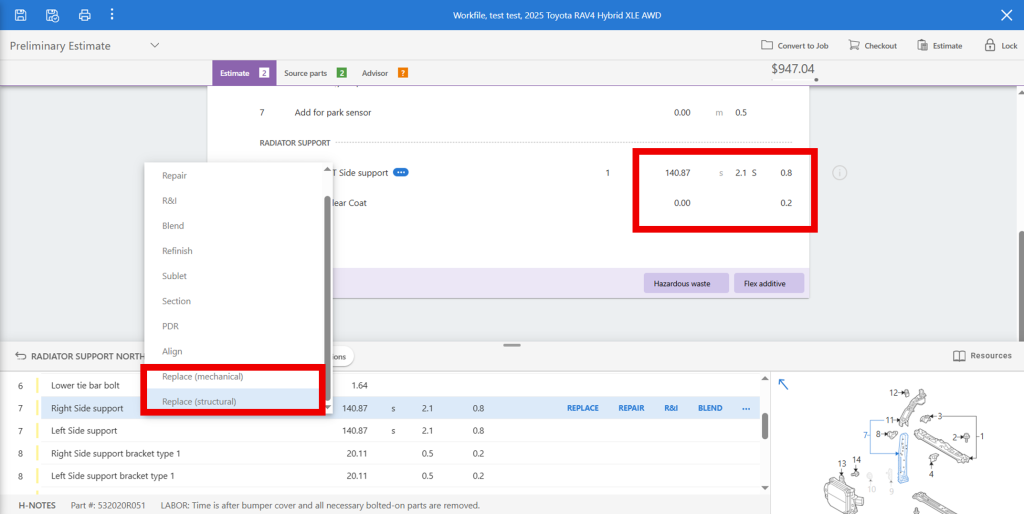
Estimating Tip – CCC – Assigning component classification designation CCC Users can quickly assign Mechanical (M) or Structural (S) rate classifications to the replacement parts by following these steps: 1. Right Click on the specific part in the part selection view. 2. Select the “Replace” option with the correct classification to be applied 3. Once the part is added the correct designator will automatically populate on the right side of the labor value Lizzy Greve2026-03-02T11:55:12-05:00February 23rd, 2026|DEG Estimating Tips| Related Posts Estimating Tip – D&R Dual Battery Vehicles Estimating Tip – D&R Dual Battery Vehicles Estimating Tip – CCCONE – Frame mounted hardware for Bed R&I / R&R Estimating Tip – CCCONE – Frame mounted hardware for Bed R&I / R&R Estimating Tip – Mitchell – Adding a Child Line Estimating Tip – Mitchell – Adding a Child Line Estimating Tip – Mitchell – Modifying replacement parts Estimating Tip – Mitchell – Modifying replacement parts Estimating Tip – CCCONE Web – Radiator Supports & Mechanical Components Estimating Tip – CCCONE Web – Radiator Supports & Mechanical Components